TUI
Legacy client reference. Desktop is the primary human product; TUI is no longer an active product surface. This page remains only while the old Zig TUI implementation is removed under the history-cleanup stage.
What the TUI is
The TUI is clumsies' terminal dashboard. It is the human-facing visual client for the system, not a separate backend and not a decorative wrapper around the CLI.
Its job is to give operators a denser view of the system than one-shot commands can provide. In practice that means artifact browsing, workspace status, review flows, and operational analysis in one terminal-native interface.
Current screenshots
The current repo already has working TUI captures. They are useful because they show the product as it exists now, not as a future wireframe.
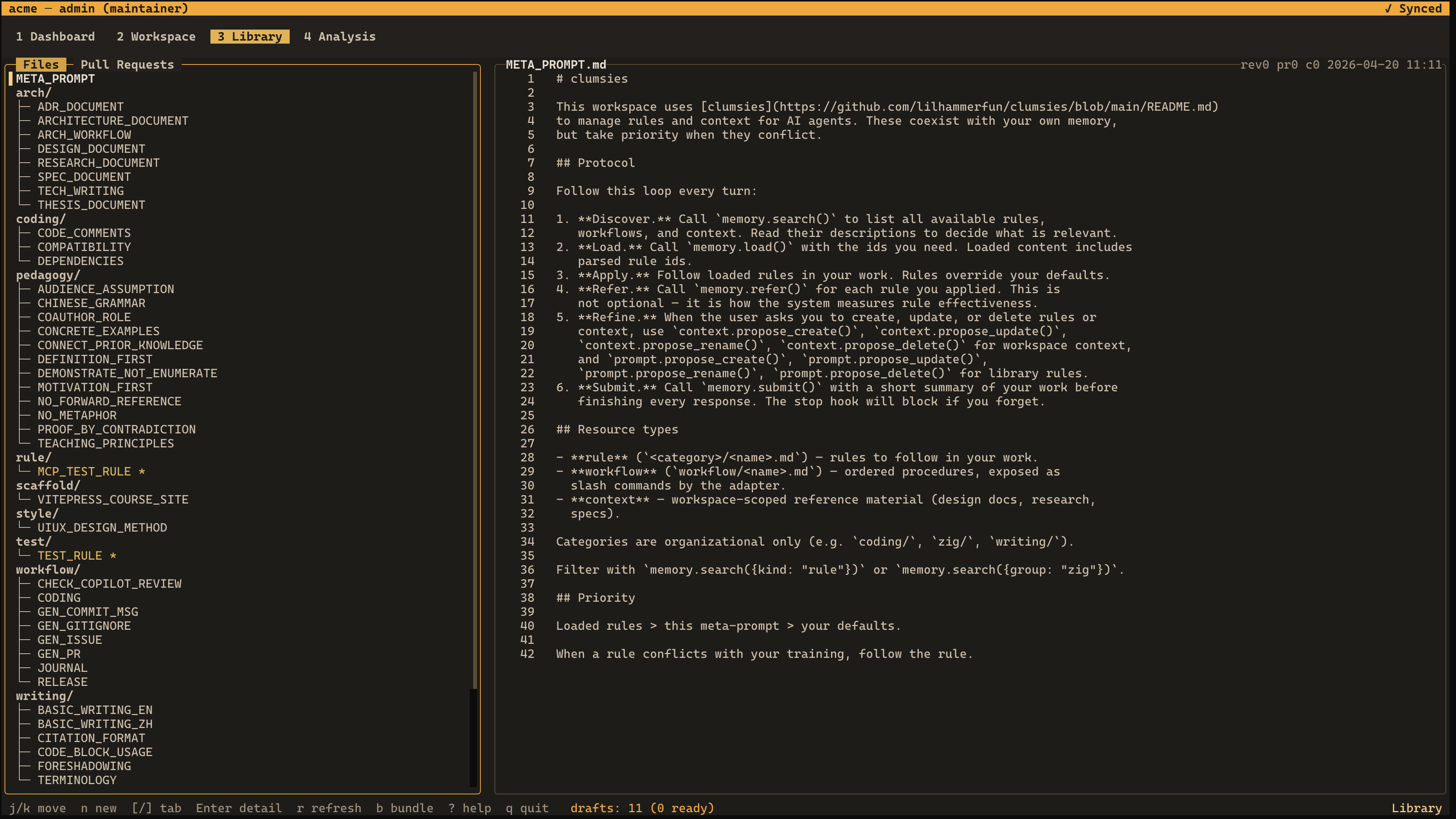
The artifact view shows the browsing side of the product: list density, selection rhythm, and the kind of terminal-native reading flow the CLI does not handle well.
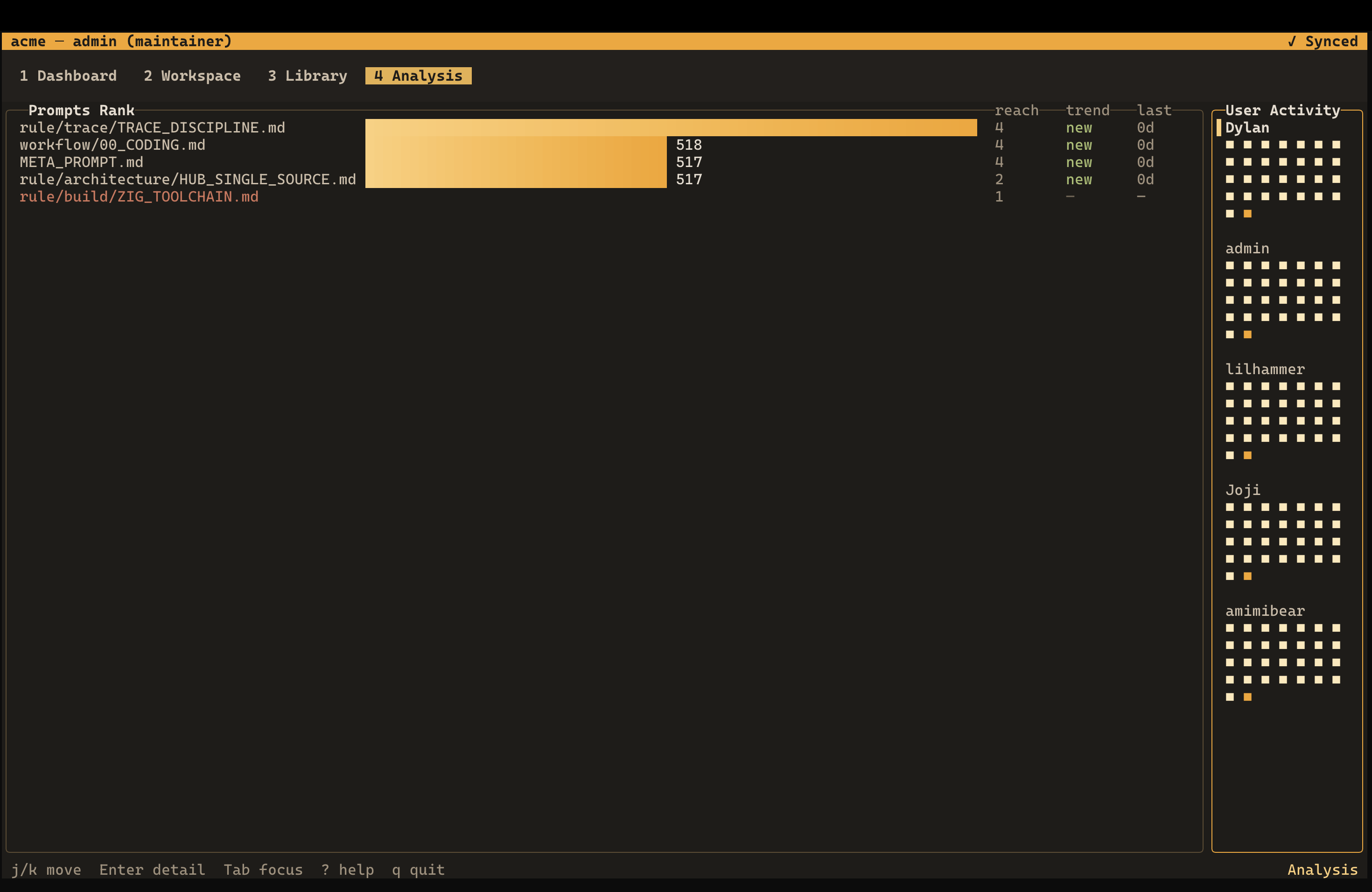
The analysis view shows why the TUI matters as its own surface. This is the kind of status-heavy, comparison-heavy screen that benefits from a persistent layout rather than a sequence of one-shot commands.
Why the TUI exists
CLI is good at discrete setup actions such as sync and adapter install. Login is shared between CLI and TUI: the TUI enters a login state itself when credentials are missing, and the CLI remains available for scripts and direct credential management. The CLI is not good at sustained observation, comparison, or review-heavy work.
The TUI exists because the product needs a place where a human can keep state in view and move through it without constantly reissuing commands. That is especially important for:
- artifact browsing
- workspace status inspection
- PR review
- insights and usage analysis
This is why the TUI should be documented as a real client surface rather than treated as an implementation detail under the CLI.
What the code already proves
The value of the TUI is not hypothetical. The current source tree already has dedicated modules for:
- dashboard
- artifact browsing
- rule detail and PR detail
- workspace status
- analysis
- settings
- attestation reading
- drafts and session readers
- diff viewer, modal, chart, split-pane, and input widgets
That matters because it shows the TUI is already a serious Server client, not a thin terminal wrapper around a few CLI commands.
Where it sits in the system
Like the CLI, the TUI is a client of Server. It reads server-backed state through the same authority model and uses local state where that improves responsiveness. It does not introduce a second truth source.
What the TUI wants to show
The dashboard spec describes the TUI as the place for several high-value operator views:
| Area | What it is for |
|---|---|
| Artifact | browse shared rules, workflows, bundle composition, and usage distribution |
| Rule detail | inspect usage, history, and related review flow |
| Workspace status | see sync state, local draft state, and project-level composition |
| Insights | analyze usage and activity patterns |
The exact screen organization is still evolving, but the product role is already clear: this is the densest human control surface in the system.
Concrete screen details in the current implementation
The current code already exposes a lot of product intent that is worth documenting.
Dashboard
The dashboard screen combines a trend chart with a live input feed.
Current details include:
- a scoped attestation trail
zfold/unfold support for the trail panel- attestation upload: background upload starts when the TUI launches
- live session count shown in the header when available
- input detail overlay for reading captured user input in full
That tells you what the dashboard is trying to be: not a static summary page, but an operational screen for current signal and recent activity.
Artifact
The Artifact screen is a true split-pane browser, not a single scrolling list.
Current behavior includes:
- left list panel plus right detail panel
- bundle filter on
b - new draft on
n - focus shift into detail on
Tab - tree fold/unfold on
z - selector mode for batch rule actions
- bundle membership PRs for adding or removing selected rules
- a separate cursor gutter so list text stays clean
That is why the screenshot matters. It is showing a specific interaction model, not a generic terminal aesthetic.
Workspace
The workspace screen is not just another Artifact variant. It has its own status and creation flow.
The current code already includes:
- workspace status layout with list and detail panes
- lower split panes
- tabs for
contextandrules - create-workspace modal flow
- optional bundle selection during workspace creation
- local path binding from the workspace UI
- row-level draft status markers
- virtual rows for create-operation drafts
- selector mode for importing Artifact rules into a workspace
- selector mode for detaching workspace rules
Directory rows are navigation and grouping controls. Folding a directory keeps the last selected file visible in the detail panel, so the user does not lose reading context just because the cursor moved to a folder row.
Settings
Settings is the management surface for account, organization, token, workspace, and membership operations.
The Workspaces tab uses a list-detail layout. The left panel selects a workspace; the detail panel shows description, bound paths, status, owner, and members. From this surface the user can create workspaces, bind the current directory, rename or remove a workspace, and manage members.
Member management supports invite creation, role changes, and removal with the same modal pattern used elsewhere in the TUI. Errors stay in the modal when the operation can be retried.
Analysis
The analysis screen is where Server stats become operator-readable.
The current code renders:
- rule ranking by reference count
- rank movement relative to the previous snapshot
- member and rule detail drill-down
- a remote-analysis availability message when Server stats have not loaded yet
This is exactly why Server interface detail and TUI detail belong together in the docs. The stats endpoints are not abstract. They drive a real operator surface.
TUI and review work
One of the strongest reasons for a TUI layer is review. Rule review, context review, and status-heavy operational flows are all more comfortable when the user can keep a list, a detail panel, and a diff-oriented reading flow on screen at the same time.
That is why the TUI matters even if the CLI remains the main operational entrypoint for single commands.
TUI and the all-Zig stack
The current architectural intent is to keep the TUI inside the same Zig-centered stack rather than introducing a separate web frontend just to get a richer operator UI.
That matters for two reasons:
- it keeps the product technically coherent
- it forces the TUI to be treated as a first-class client, not as a temporary stopgap before "the real UI"
What to read next
If you are reading from the product side, go back to Runtime surfaces. If you are reading from the implementation side, continue to Codebase map and then inspect src/client/tui/.